
The Internet Ping command bounces a small packet off a domain or IP address to test
network communications, and then tells you how long the packet took to make the round
trip. The Ping command is one of the most commonly used utilities on the internet by
both people and automated programs for conducting the most basic network test: can
your computer reach another computer on the network, and if so how long does it
take?
How Ping was Invented
The modern Internet Ping command refers to a program written by Mike Muuss in
December 1983, which has since become one of the most versatile and widely used
diagnostic tools on the Internet. Muuss named his program after the sonar sounds
used for echo-location by submarines and bats.
How Ping Works
The Internet Ping program works much like a sonar echo-location, sending a small
packet of information containing an ICMP ECHO_REQUEST to a specified computer,
which then sends an ECHO_REPLY packet in return. The IP address 127.0.0.1 is set
by convention to always indicate your own computer. Therefore, a ping to that
address will always ping yourself and the delay should be very short. This provides
the most basic test of your local communications.
How to use Ping
You can use the Ping command to perform several useful Internet network diagnostic tests, such as the following:
- Access. You can use Ping to see if you can reach another computer. If you can't ping a site at all, but you can ping other sites, then it's a pretty good sign that your internet network is fine and that particular site is down. On the other hand, if you can't ping any site, then it's likely that your entire network connection is down - try rebooting your equipment in this scenario.
-
Time & distance. You can use the Ping command to determine how long it takes to bounce a packet off of another site, which tells you its internet distance in network terms. For example, a website hosted on your neighbour's computer next door with a different internet service provider might go through more routers and be farther away in network distance than a site on the other side of the ocean with a direct connection to the internet backbone.
- If a site seems slow, you can compare ping distances to other Internet sites to determine whether it is the site, the network, or your system that is slow. You can also compare ping times to get an idea of which sites have the fastest network access and would be most efficient for downloading, chat, and other applications.
-
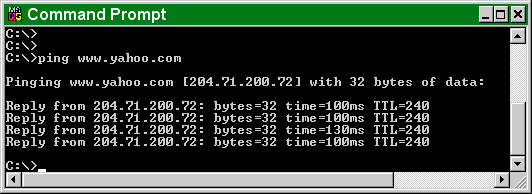
Domain IP address. You can use the Ping command to probe either a domain name or an IP address. If you ping a domain name, it helpfully displays the corresponding IP address in the response.
You can run the ping command on a Windows computer by opening an MSDOS window and then typing "ping" followed by the domain name or IP address of the computer you wish to ping. You can list the available options for the Windows ping command with "ping -?".
Online ping.
If you can't use the Ping command from your own computer because of a firewall or other restriction, or want to do an internet ping from another location than your own, you can use one of the following websites that offer online ping services:
• his.com Ping
• hq42.net Networking Tools
• Network-Tools
• Spfld.com Ping
• Theworldsend.net ping
Remember when doing an online ping that the packets are sent from that website, so the times that are returned reflect the path from that location and not from your computer. Nevertheless, a ping from an online website can be useful to test if an address can be reached from different places around the internet, to do comparative timing to test how long it takes to reach one site compared to others.
If the times returned by several online ping sites to an Internet address are consistently long, then the destination site's network is likely having problems. On the other hand, if you can ping an address from an online ping site but not from your own computer, then there is likely some block in your network preventing you from communicating with that site.
Comments
0 comments
Please sign in to leave a comment.